A schedule app for nurses and shift workers
One photo of your schedule
fills your calendar
Photos stay on your phone. No ads. Just check any cells it couldn't read.
iPhone · Android · free to start
My shifts
One photo puts this
month's shifts on your calendar
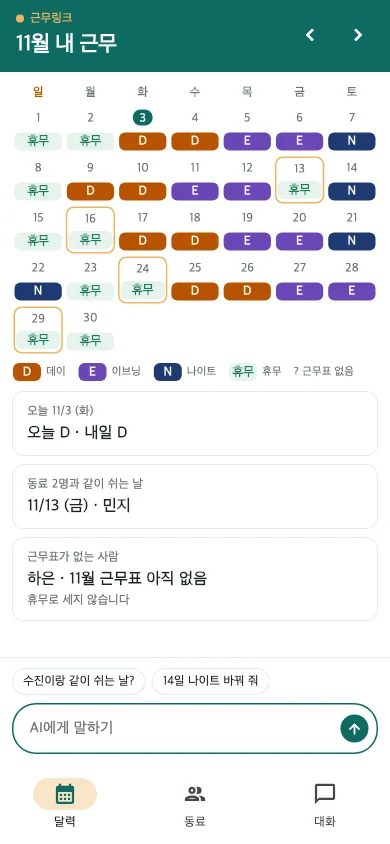
Import your schedule from a photo and it lands on your calendar. Cells it couldn't read are marked yellow, so just check those. You can also tap D, E, N or off to fill in and fix shifts by hand. Today's and tomorrow's shifts show right on the first screen, along with the days off you share with coworkers.
Coworkers
Overlay schedules to
see shared days off
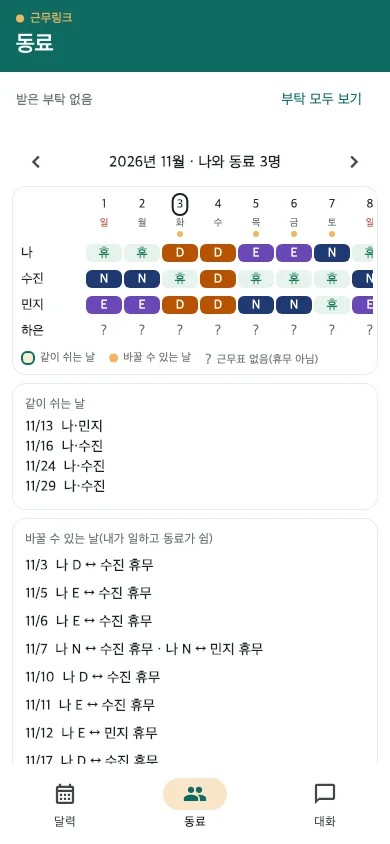
Create a group and invite coworkers to see everyone's shifts on one screen. A coworker who hasn't entered a schedule yet shows as “?” and isn't counted as off.
Swap requests
Send and answer swap
requests as cards
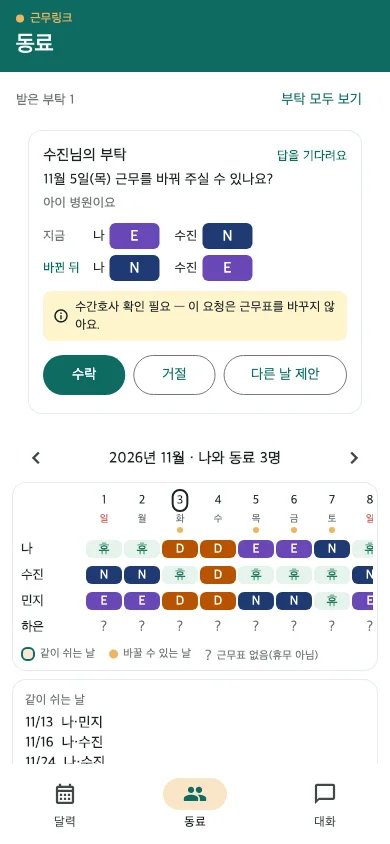
Reply with accept, decline or suggest another day. The card shows both shifts, before and after the swap. Once you agree, be sure to confirm with the person in charge of the schedule.
From the AI you already use
ChatGPT or Claude: just ask
and it compares your coworkers' shifts
Connect Offcross to the AI app you already use, in its settings, and you can ask it about your shifts and the days off you share with coworkers right there. It only sees what you allow, and you can disconnect anytime in the app.
- Ask about my shifts
- Ask about shared days off
- Disconnect anytime in the app
When do Sujin and I have days off together in November?
Offcross · comparing coworkers' shifts
Here are the days off you and Sujin share in November.
- 16OFF
- 24OFF
- 29OFF
This is based on the schedules you both entered in Offcross. Confirm with your schedule manager.
Example screen · names are made up · AI answers can be wrong
Offcross only connects people.It connects someone who wants to swap with someone who can. The schedule manager at your workplace confirms the actual change.
A separate app from UnionLink · anyone can use it, no union membership needed.